
(Financial Reporting for Commission Admin)
TABLE OF CONTENTS
- Report Purpose
- Exporting Invoice & Reimbursement Reports
- Saving Export Options & Sharing Options with Others
- Using, Editing, Cloning, and Deleting Saved Export Options
Report Purpose
Use this report to immediately see a history of expense report approval amounts, amounts paid, and the dates when each payment was made and recorded -- all broken out by each subgrantee.
Here's a sample of what you'll see for a given expense report period: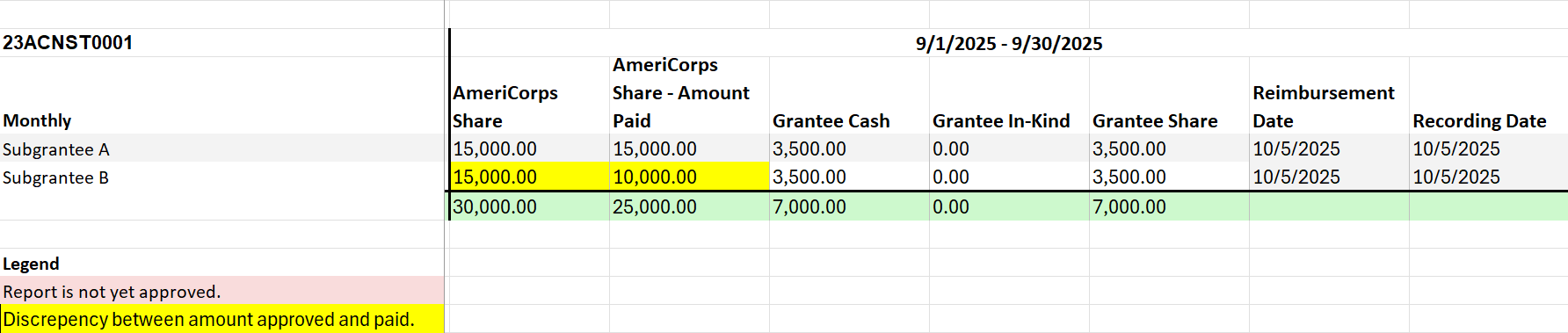
Exporting Invoice & Reimbursement Reports
Follow these steps to export subgrantees' expense report details over any period of time during a program year:
- On the left-hand side of your Mission Control, click Financial Reporting.
- Select the program year you’d like to access and click Build Reports.
- On the next page, click Invoice & Reimbursement Tracker.
- Follow the three prompts to select the subgrantees for the report, the time period you need, and the specific metrics you need. The report will generate near-instantly for you.
Saving Export Options & Sharing Options with Others
When you select columns to include in the export, you'll be asked if you'd like to save your selection for the future to prevent having to check off a bunch of boxes down the road (see the red arrow below).
And after entering a name for your saved export, you'll be asked if you'll be saving that format just for you, or for others on your team as well (see the orange arrow below). Select the appropriate option and click the Set button at the bottom-right.
Using, Editing, Cloning, and Deleting Saved Export Options
To use, edit, clone, or delete saved export options, at the top of Step 3 of the export page, select "Use a Saved Export Option" and then select the option you'd like to use, update, clone or delete (see the green arrow below). Follow the prompts and you'll be good to go.

Was this article helpful?
That’s Great!
Thank you for your feedback
Sorry! We couldn't be helpful
Thank you for your feedback
Feedback sent
We appreciate your effort and will try to fix the article