
TABLE OF CONTENTS
- Why would you want to bypass “required upon archiving” fields?
- Remove the "Required Upon Archival" Setting (Individual Fields)
- Remove the "Required Upon Archival" Setting (Multiple Fields)
Why would you want to bypass “required upon archiving” fields?
There may be situations where you need to temporarily or permanently bypass fields that are marked as "required upon archiving" when archiving reporters.
This is most commonly needed when a required field cannot be completed for a specific reporter, or when a field is no longer relevant to your program.
Common scenarios include:
- A field is marked as required upon archiving and has been completed for most reporters. However, due to circumstances such as an early exit or missing information, you’re unable to complete the field for a single reporter. In this case, you may want to temporarily turn off the "required upon archiving" setting, archive the reporter, and then re-enable the requirement to maintain data integrity.
- A field was previously required upon archiving but is no longer relevant to your program or operations. In this case, you may want to permanently disable the "required upon archiving" setting for that field.
Remove the "Required Upon Archival" Setting (Individual Fields)
- On the left, in your Mission Control, click Reporters, Admins, & Sites.
- On the right, click Manage reporter accounts.
- On the right, use the More drop-down menu and select Manage Fields and Profile Layout.
- Click on the name of the field you'd like to update.
- A window with the field settings will open.
- Under Reporter Editing & Archiving Options, uncheck both the boxes labeled (1) Require this field to be completed by admins when AND (2) archiving an account.
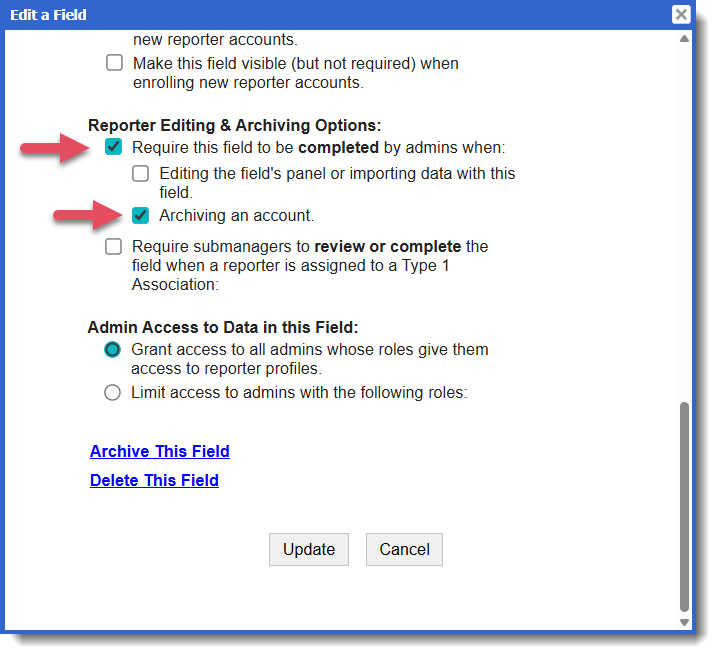
- Click Update.
- If this is a temporary change, follow the steps above to re-enable the field after archiving the affected reporter(s).
Remove the "Required Upon Archival" Setting (Multiple Fields)
To quickly scan all fields and decide which need to be required upon archiving an account, please do the following:
- On the left, in your Mission Control, click Reporters, Admins, & Sites.
- On the right, click Manage reporter accounts.
- On the right, use the More drop-down menu and select Manage Fields and Profile Layout.
- On the top-right, click Manage Fields.
- In the table, use the checkboxes under the column Require when Archiving an Account to quickly update the field settings. Your changes will be saved automatically.
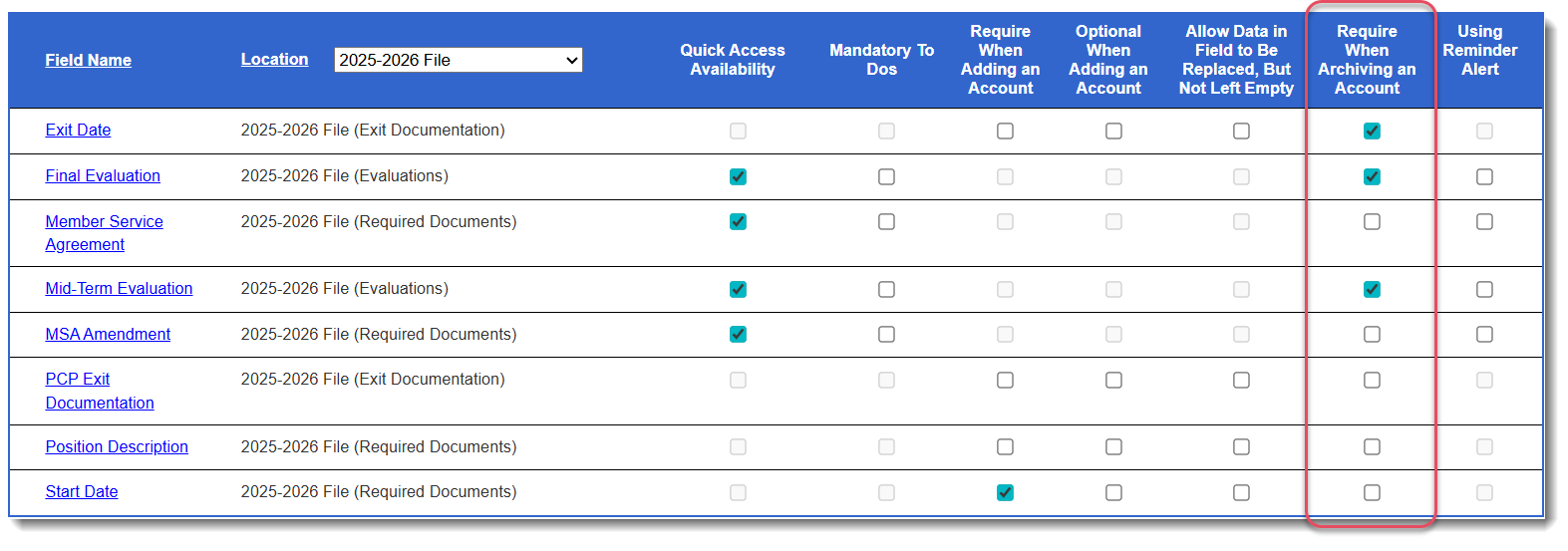
- If this is a temporary change, follow the steps above to re-enable the field after archiving the affected reporter(s).
Was this article helpful?
That’s Great!
Thank you for your feedback
Sorry! We couldn't be helpful
Thank you for your feedback
Feedback sent
We appreciate your effort and will try to fix the article