
TABLE OF CONTENTS
- Step 1: Create your timesheet association
- Step 2: Create your template
- Step 3: Create reporter-level accounts for admins (using the same email address as their admin accounts)
- Step 4: Train Admins
- Step 5: Update your Policies & Procedures
Your program may need to capture time for your Site Supervisors in addition to your reporters. This article covers the two most common setups for these folks.
Step 1: Create your timesheet association
Follow these steps to create a new Timesheet Association for your admin reporters completing timesheets:
On the left, in your Mission Control, click Timesheets.
On the right, click Manage your timesheet association.
- To Add a New Option
1) Give the option a name (Admin Timesheet Completer, Supervisor, etc.).
2) Add the minimum number of hours that the reporter must accrue. (This is likely "0".)
3) Click Add.
4) To save your changes, click Update & Apply Edits. The new settings take effect immediately.
Step 2: Create your template
Check out this article for steps on creating your Timesheet Template as well as this detailed updated with admin timesheet guidelines and recommendations.
The two core compliance items relevant to your template creation are below:
- Admin Timesheet Signatures:
A single signer can sign admin timesheets, and this signer can be the AmeriCorps Program Manager.
For the Program Manager's timesheet, another admin in the organization needs to provide their signature, and this person should not be a subordinate of that Program Manager.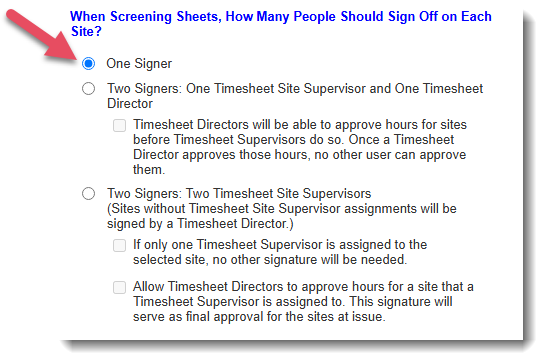
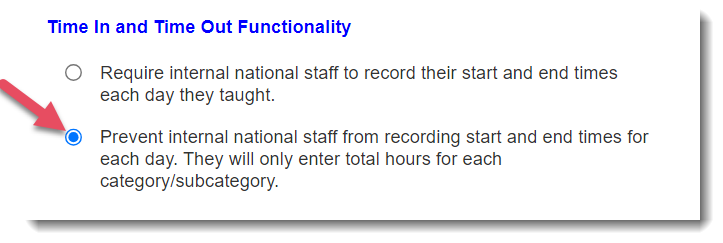
- Timekeeping in the Impact Suite:
Admin timesheets in the Impact Suite do not need to document specific clock-in and clock-out times, nor do they need to include all time spent on other grants.
However, this time spent on other grants must be tracked in an alternative timekeeping system (likely the organization-wide timekeeping system), and the location of this documentation must be detailed in the program's Timesheet Policy and Procedures.
Step 3: Create reporter-level accounts for admins (using the same email address as their admin accounts)
Here's an article that reviews creating reporter accounts using Excel.
Please remember to use the same email address that you used to create the admin account. This will ensure that they'll be able to toggle between their accounts using the 'my accounts' drop-down menu:

Step 4: Train Admins
For most admins, all they'll need is the short video: https://vimeo.com/166579064/ca815bf099
If you need custom training materials, please email us at support@americalearns.net.
Step 5: Update your Policies & Procedures
This is a critical step in maintaining compliance.
Your Policies and Procedures Document MUST include information detailing where non-AmeriCorps admins time is kept. Here is a sample Policies and Procedures document for you to use as a template if you don't currently have one: AmeriCorps Member File Policy and Procedure Template.
Was this article helpful?
That’s Great!
Thank you for your feedback
Sorry! We couldn't be helpful
Thank you for your feedback
Feedback sent
We appreciate your effort and will try to fix the article