
Tracking and Following Up with Reporters with Overdue Timesheets
Follow these steps:
On the left, in your Mission Control, click Timesheets.
On the right, select View program-wide data or Site data.
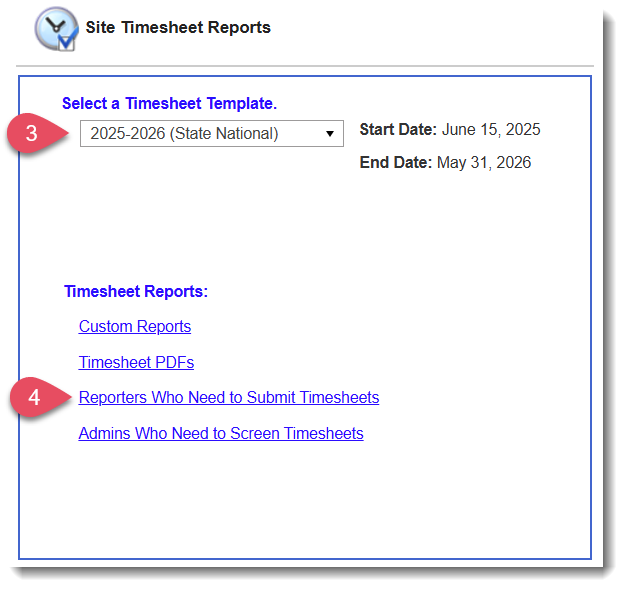
On the next page, select the Timesheet Template at issue.
At the bottom of the page, select Reporters Who Need to Submit Timesheets.
- On the following page, choose one of the following options:
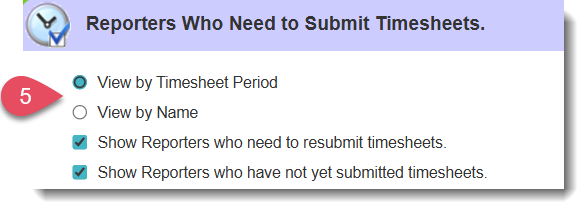
- View by Timesheet Period
This option displays a list of reporters who have not submitted their timesheets, organized by period. - View by Name
This option displays a list of reporters who have not yet submitted their timesheets, organized by reporter name.
- View by Timesheet Period
- Once you complete Step 5, you’ll notice that two checkboxes appear:
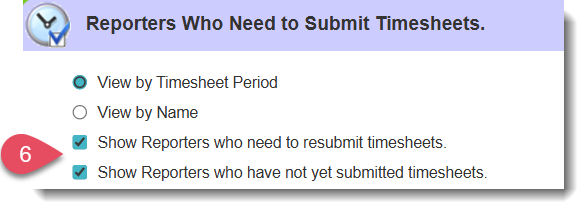
- When you leave both checkboxes selected, the report will contain a list of reporters who have not submitted timesheets for a given period AND who have not yet resubmitted a returned timesheet.
- You can use the checkboxes to only see individuals who have not submitted any timesheets for a given period, or to only see individuals who have not resubmitted timesheets that have been returned to them.
- When you leave both checkboxes selected, the report will contain a list of reporters who have not submitted timesheets for a given period AND who have not yet resubmitted a returned timesheet.
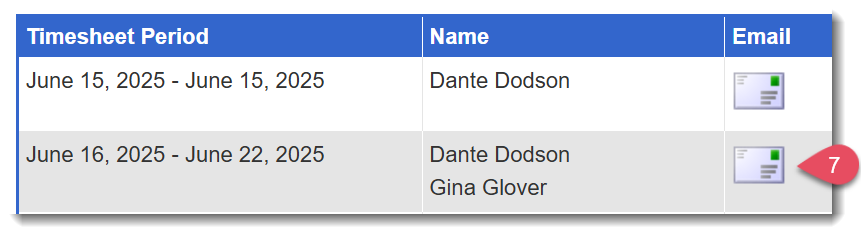
Note that each option gives you the ability to send individual or mass emails or text messages to the reporters who are listed.
Was this article helpful?
That’s Great!
Thank you for your feedback
Sorry! We couldn't be helpful
Thank you for your feedback
Feedback sent
We appreciate your effort and will try to fix the article